 Softrivo
WhatsApp Business API cost in Malaysia (2026): what SMEs actually pay
Meta's WhatsApp API fees in Malaysia in ringgit: marketing, utility and service rates after the October 2026 change, a worked example and provider costs.
Short answer: using the official WhatsApp Business API in Malaysia costs two things. Meta charges per message for messages you start, in ringgit. Your WhatsApp platform or provider charges a monthly subscription. Since 1 October 2026, replies to customers who message you first are free only up to 1,000 a month per number, so a busy inbox now shows up on the bill too.
The two parts of your WhatsApp API bill
- Meta’s messaging fees. Charged per delivered message, by message category. Template messages your business starts are always charged, and since 1 October 2026 your replies are charged after the first 1,000 each month. Since 1 April 2026, Malaysian businesses are billed in ringgit. Fees follow the recipient’s country code, so messages to Singapore (+65) numbers are charged at Singapore rates.
- Your provider’s subscription. The WhatsApp API has no app of its own, so you use it through a platform that gives you an inbox, automation and integrations. Providers charge a monthly fee, usually by message volume, users or features.
Meta’s WhatsApp fees in Malaysia
| Message type | When it is used | Fee per message (MYR) |
|---|---|---|
| Marketing | Promotions, offers, re-engagement, newsletters | RM0.3467 |
| Utility | Appointment reminders, order and delivery updates, booking confirmations | RM0.0564 |
| Service | Your replies when a customer messages you first, inside the 24-hour customer service window | First 1,000 per number each month free, then charged at Meta’s service rate |
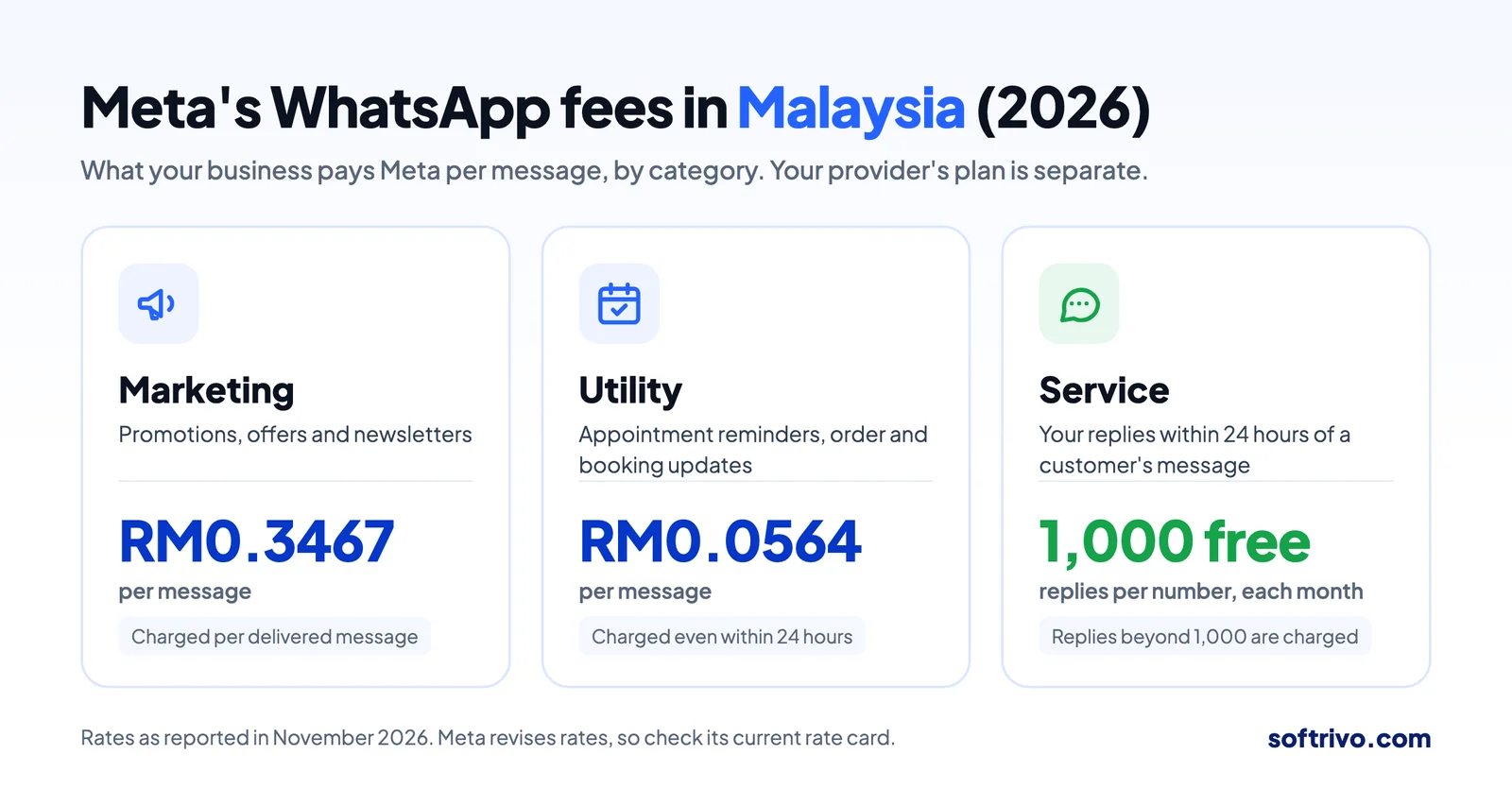
The 24-hour window still matters. When a customer sends you a message, you can reply with normal messages for the next 24 hours. Outside that window you can only send pre-approved template messages, and those are charged by category. What changed on 1 October 2026 is that replies inside the window are no longer unlimited and free: each number gets 1,000 free service messages a month, and template messages, including utility templates, are charged even inside the window.
A worked example: a family clinic
This is an illustration, not a quote. Suppose a clinic in a month:
- replies to patient enquiries inside the window: the first 1,000 replies are free; replies beyond that are charged at Meta’s service rate (service)
- sends 300 appointment reminders: 300 × RM0.0564 = RM16.92 (utility)
- sends one health-screening promotion to 500 patients who opted in: 500 × RM0.3467 = RM173.35 (marketing)
Reminders and the promotion come to about RM190. Without the promotion, they would be under RM20. A clinic that sends more than 1,000 replies in a month adds a service line on top, and the provider subscription comes on top of that.
What a provider costs
Provider pricing varies widely, from simple inbox tools to AI assistants that answer customers for you. When you compare, check what is included: how many conversations or users, whether AI replies are included or extra, whether the provider adds a markup to Meta’s fees, and how long setup takes.
For reference, Softrivo’s WhatsApp AI Assistant plans start at RM299 a month for 2,000 conversations (a conversation is one customer chat, however many messages it has). The assistant answers from your own price lists and FAQs in English, Bahasa Malaysia and Chinese, and books appointments. Meta’s messaging fees are separate.
If your business is comparing voice automation as well as chat, see how AI can answer WhatsApp calls, take booking requests and hand over to staff when needed.
Five ways to keep your WhatsApp costs down
- Reply inside the 24-hour window. Inside the window you can answer with normal messages instead of paid templates, and the first 1,000 replies each month are free. An AI assistant that answers at night and on weekends keeps you inside the window.
- Use utility templates for reminders. A booking reminder sent as a utility message costs a fraction of a marketing message.
- Only message people who opted in. It is cheaper, it is what Malaysia’s PDPA expects, and it protects your number from reports and bans.
- Send fewer, better promotions. Marketing messages are the expensive category. Target them.
- Avoid unofficial WhatsApp tools. Bots that run on the normal WhatsApp app break WhatsApp’s terms and can get your number banned. The official API is the safe route.
Frequently asked questions
Is the WhatsApp Business app free?
Yes. The app is free but made for one phone and a few linked devices. The API is for businesses that need automation, a team inbox or integrations, and it is paid per message plus the provider fee.
Do I pay for messages customers send me?
No. Incoming messages are free. Since 1 October 2026, your first 1,000 replies each month inside the 24-hour window are free, and further replies are charged at Meta’s service rate.
What do I need to get the official API?
A Meta business account, a phone number for WhatsApp, and business verification. Malaysian businesses usually verify with their SSM registration. Your provider guides the setup.
Are there extra charges for messaging Singapore numbers?
Meta charges by the recipient’s country code, not yours. Messages to +65 numbers are billed at Singapore rates. See WhatsApp AI assistant for Singapore businesses.
Should I start with the free app instead?
If one person answers a handful of chats a day, the free app may be enough. Read WhatsApp Business app vs API: which one does your SME need? to see when it is time to switch.